


A lost key usually costs more than the key. It costs time, uncertainty, and sometimes a full rekey job that no office manager wanted to pay for that month. That is usually the moment an access control system for office spaces stops sounding optional and starts sounding practical.
For small and mid-sized businesses, office access is not just about locking the front door. It is about deciding who can enter, when they can enter, and what happens when staffing, schedules, or risk levels change. The right system gives you control without creating daily friction for employees, tenants, or visitors.
What an access control system for office actually does
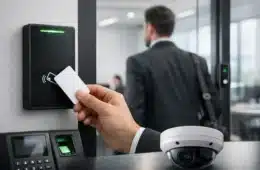
At a basic level, an office access control system replaces traditional keys with managed credentials. Those credentials might be key cards, fobs, mobile phone access, PIN codes, or a combination of methods depending on the door and the user. Instead of handing out copies of a key and hoping they come back, you assign permissions through software and adjust them when needed.
That sounds simple, but the real value is in what happens behind the scenes. You can restrict sensitive rooms to specific staff, schedule access by time of day, review entry events, and remove access quickly when an employee leaves. For many businesses, that means fewer security gaps and less administrative cleanup.
The system can also work as part of a larger setup. When access control is planned alongside cameras, alarms, intercoms, networking, and structured cabling, the result is easier to manage and more dependable over time. That matters in real offices where technology problems rarely stay in one category.
Why offices outgrow keys and standalone locks
Most offices do not replace keys because they want new hardware. They do it because the old way creates too many blind spots.
Traditional locks are hard to manage once a business grows beyond a few people. If one employee leaves without returning a key, you are left guessing whether to ignore the risk or change hardware. If a cleaner, contractor, or former tenant had access at some point, there may be no clear record of who still does. And if you manage multiple offices, the problem multiplies fast.
Standalone keypad locks solve a small part of that problem, but they often create another one. Shared codes get passed around, updates are inconsistent, and there is usually limited reporting. They can be fine for a low-risk interior door, but they are rarely the best long-term answer for a main entry, server room, records area, or shared commercial space.
A managed access control system gives you a cleaner way to handle real office needs. You can issue individual credentials, set schedules, and update access without changing physical locks every time a role changes.
Choosing the right office access setup
There is no single best system for every office. The right choice depends on the building, the doors, the staff size, the hours of operation, and how much control you need.
Single-door offices
A small office with one main entry may only need a basic electronic lock, a credential reader, and software to manage users. Even here, details matter. You still want reliable hardware, battery or power planning, and a clean installation that does not turn the front entrance into a service call waiting to happen.
Multi-door offices
Once you add interior offices, storage rooms, IT closets, and employee-only entries, the conversation changes. You may want different permission levels for management, staff, vendors, and after-hours cleaning crews. In that case, centralized management becomes more important than the lock itself.
Shared and multi-tenant spaces
If your office is part of a larger property, access control often needs to balance security with convenience. A front lobby, suite entrance, common hallways, and delivery access may all involve different users and different rules. Good planning keeps the system practical instead of overcomplicated.
High-security areas
Not every door needs the same level of protection. A break room is different from a medical records room, finance office, or server closet. Some offices need multi-factor access, door position monitoring, or tighter event logging on a few specific openings rather than expensive hardware everywhere.
Credentials, readers, and software
This is where many buyers get stuck, because the system is not just one product. It is a combination of door hardware, readers, power, wiring, controllers, and management software.
Cards and fobs are familiar and easy to hand out, but they can still be lost. Mobile credentials reduce that problem and can be easier to issue remotely, though some businesses prefer a physical badge for visitors or warehouse staff. PIN-based access works in some cases, but if everyone shares the same code, accountability goes out the window.
Reader choice matters too. Exterior doors need hardware built for daily wear, weather exposure, and heavy use. Interior doors may allow more flexibility. Then there is the software side. Some businesses want a simple interface with basic scheduling and event logs. Others need multi-site visibility, user groups, role-based permissions, and integration with cameras or alarm events.
A cheaper system that is difficult to manage often becomes expensive in labor, frustration, and support calls. Ease of use is not a bonus feature. It is part of system performance.
Why installation quality matters as much as the equipment
An office access control system can fail for reasons that have nothing to do with the brand on the box. Poor door alignment, bad cabling, weak power design, and rushed setup are common sources of trouble. When doors do not latch correctly or readers are mounted without considering real traffic flow, daily use becomes inconsistent fast.
That is why office access control should be treated like infrastructure, not a gadget. Clean cable runs, properly mounted hardware, labeled components, and a thoughtful programming setup make a big difference. So does testing every credential type, schedule, and fail condition before the job is considered complete.
This is also where working with a provider that understands networking, low-voltage systems, and on-site support can save time later. If your access system depends on stable connectivity, camera integration, remote management, or coordinated door hardware, piecing it together through separate vendors usually creates delays when something needs service.
Common mistakes businesses make
One common mistake is buying for today only. A system that works for eight employees may not work well when the office expands to twenty-five, adds a warehouse door, or opens a second location. Another is overbuilding the system with enterprise features that the business will never use.
There is also the issue of policy. Technology can only do so much if credentials are shared, doors are propped open, or no one owns user management. Office security works best when the setup matches how the business actually operates.
Budget matters too, but cheapest upfront is not always cheapest long term. Replacing unreliable hardware, dealing with frequent lockouts, or paying repeated service costs adds up quickly. Good systems are not just about security. They reduce avoidable headaches.
When integration makes the most sense
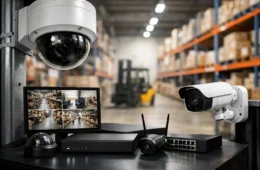
Access control becomes more useful when it works alongside the other systems your office already depends on. If a door is forced open after hours, it helps to pair that event with camera footage. If you manage multiple locations, remote visibility across sites can save a lot of unnecessary driving and phone calls. If your office is already upgrading network infrastructure or adding surveillance, it often makes sense to plan access control at the same time.
That coordinated approach is one reason many businesses prefer a hands-on partner rather than separate installers for security, cabling, networking, and support. Cloud 504 Technologies works with offices across Texas, Louisiana, and Oklahoma that need systems installed cleanly, configured properly, and supported after the job is done.
How to know it is time to upgrade
If you are rekeying doors repeatedly, managing too many physical keys, or relying on shared entry codes, you are probably already paying the price of an outdated setup. The same goes for offices with turnover, multiple suites, sensitive records, or limited visibility into after-hours access.
A good access control system for office use should make security easier to manage, not harder. It should fit the doors you have, the people you have, and the way your business runs day to day. Most of all, it should still make sense a few years from now when your office changes, because it will.
The best time to fix access problems is before they turn into security incidents or daily workarounds. A well-planned system gives you fewer keys to chase, fewer gaps to worry about, and a lot more control over who comes and goes.