



Description
Access Intercom at a glance
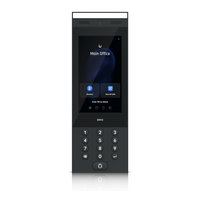
Access Intercom. Product reference: Ubiquiti UA-INTERCOM. Check the verified model and configuration below against your existing equipment before ordering.
Key specifications
UA-Intercom
(1) GbE RJ45 port
2MP 1200 x 1600 (3:4)
Wall mount, adapter to the gooseneck pedestal (Included) Surface angle, flush mount, sunshield kit (Optional)
PoE UL 294 Power-limited Class 2 PSU UL 60950-1/62368-1 LPS/PS2 PSU
324.8 x 113.7 x 28.3 mm (12.8 x 4.5 x 1.1")
Installation and planning details
All-in-one UniFi Access intercom with 7-inch touchscreen, integrated camera, two-way audio, NFC, PIN and mobile credentials, and secure visitor entry workflows. Use it at controlled entrances, office lobbies, warehouses, multi-tenant properties, gates, and other locations where staff need to see, speak with, and authorize visitors.
Why this product fits a professional installation
IP intercom performance depends on more than the door station. PoE, switching, VLAN design, SIP or cloud configuration, door hardware, access credentials, relays, and network reliability all contribute to a dependable entry system. Ubiquiti UA-INTERCOM gives installers a purpose-built component that can be planned as part of the complete system instead of treated as a stand-alone device.
Cloud 504 integration
Cloud 504 can integrate this product with access control, locks, door strikes, maglocks, request-to-exit devices, cameras, networks, and remote management. We design around the actual site, existing equipment, network conditions, room or door layout, future expansion, and the way the customer expects to use the system day to day.
Planning and support
For new installations and upgrades, Cloud 504 can help determine compatibility, required accessories, mounting, cabling, power, network configuration, and related hardware before deployment. This helps reduce avoidable service calls and keeps the finished system easier to support remotely.
Manufacturer model: UA-INTERCOM
ADI part number: KX-UAINTRCOM
Related Cloud 504 Services
For system design and installation guidance, visit the related Cloud 504 service page or request a Cloud 504 quote for help selecting, installing, and integrating the complete solution.
Choosing equipment for your project
Before requesting an installation quote, save the manufacturer model and the configuration shown on this page. If this item must work with existing equipment, include the existing model numbers and clear photographs of the connection or mounting points. This helps confirm the correct parts before equipment is ordered.
Review quantities, cable routes, power requirements and access to the work area with the installer. Ask which accessories, related equipment, software or licenses are included in the proposal and which need to be supplied separately. Keep the approved equipment list with your project documents so substitutions can be checked before installation.
After installation, request a demonstration of the completed work and retain the product details and any configuration records for future service.
Installation and support
Cloud 504 can help with product selection, installation and configuration. Required labor and related equipment are quoted separately.
Reviews
There are no reviews yet.